AI-Ready Laptop Buying Guide: NPU Specs & 32GB RAM
Advertisements
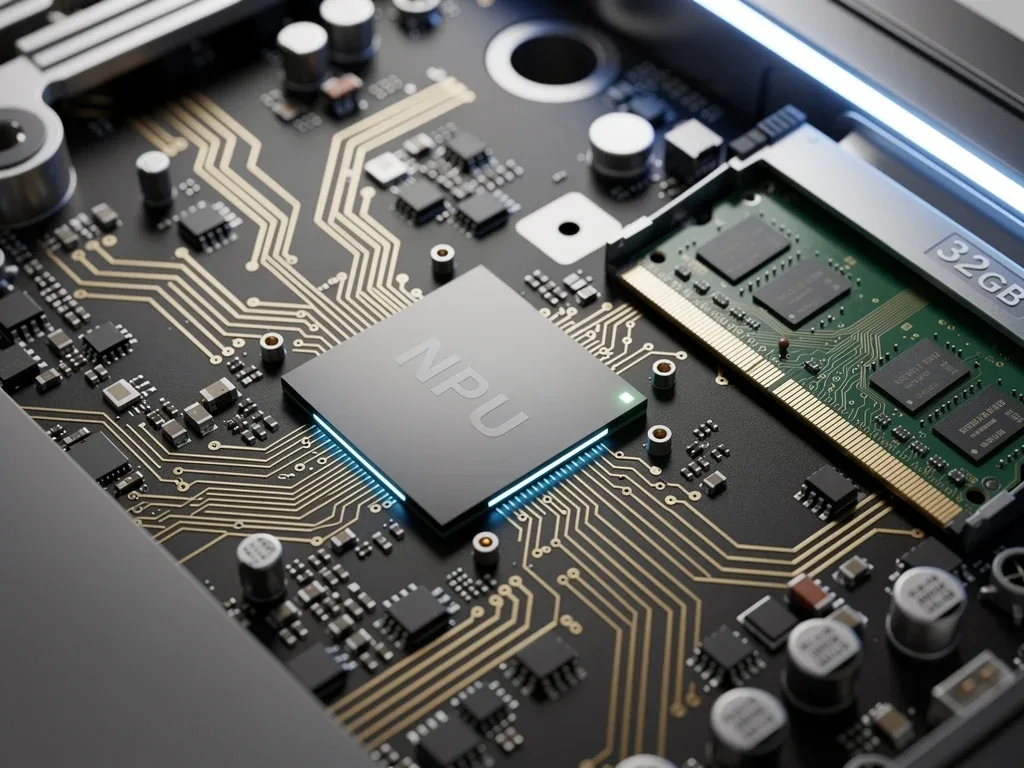
Upgrading your PC setup for modern workflows requires looking beyond traditional processor speeds and display specs. Consulting a comprehensive AI-Ready Laptop Buying Guide ensures you select machines equipped with dedicated Neural Processing Units (NPUs) and 32GB RAM to handle complex artificial intelligence tasks natively.
Integrated neural accelerators offload heavy machine learning workloads from the main CPU, drastically improving battery efficiency and system responsiveness. Pairing these specialized AI chips with high-bandwidth memory prevents performance bottlenecks during real-time image generation and local language model execution.
Choosing hardware optimized for next-generation software prevents premature device obsolescence while accelerating daily computing tasks. Here is how to evaluate neural processor specifications and memory configurations to find your ideal high-performance computer.
Understanding the Core of AI: NPU Specifications
The Neural Processing Unit (NPU) is the dedicated hardware accelerator for AI tasks, designed to efficiently handle machine learning algorithms. Its emergence marks a significant shift from relying solely on the CPU and GPU for AI computations, offering enhanced performance and power efficiency for on-device AI.
For consumers navigating the AI-Ready Laptop Buying Guide, understanding NPU capabilities is crucial. A powerful NPU can drastically improve the speed and responsiveness of AI-driven features, from advanced image processing to real-time voice recognition and intelligent power management.
Manufacturers are rapidly integrating NPUs into their latest processors, making them a cornerstone of what defines an 'AI-ready' machine. Evaluating the NPU's TOPS (Tera Operations Per Second) rating provides a clear metric for its processing power and potential.
The Significance of TOPS in NPU Performance
TOPS represents the raw computational power of an NPU, indicating how many trillion operations it can perform per second. Higher TOPS figures generally translate to better performance for AI tasks, allowing for quicker inference and more complex model execution directly on the device.
When consulting an AI-Ready Laptop Buying Guide, a minimum of 10-20 TOPS is often recommended for a solid entry-level AI experience. Premium AI-ready laptops, however, are pushing upwards of 30-40 TOPS, offering significantly more headroom for demanding applications.
Entry-Level AI: Look for NPUs with at least 10 TOPS for basic AI features like enhanced video calls and background blur.
Mid-Range AI: Aim for 20-30 TOPS to comfortably handle more complex tasks, including local image generation and advanced AI-powered productivity tools.
High-End AI: Systems with 40+ TOPS are designed for professional AI development, complex data analysis, and running multiple intensive AI applications simultaneously.
The efficiency of an NPU also plays a vital role, as it allows AI tasks to be performed with less power consumption, extending battery life. This is particularly important for mobile users who rely on their laptops for AI workloads on the go.
The Critical Role of 32GB RAM in AI Laptops
While the NPU handles specialized AI computations, Random Access Memory (RAM) remains a fundamental component for overall system performance, especially in AI-driven environments. For an AI-Ready Laptop Buying Guide, 32GB of RAM is increasingly becoming the baseline for serious AI work.
AI applications, particularly those involving large datasets, complex models, or multiple concurrent tasks, are notoriously memory-intensive. Insufficient RAM can lead to significant bottlenecks, slowing down processing and hindering productivity, even with a powerful NPU.
The current standard of 16GB RAM, while adequate for general use and some light AI tasks, quickly becomes a limitation when dealing with more demanding AI workloads. Upgrading to 32GB ensures smoother operation, faster data access, and the ability to run more applications simultaneously without performance degradation.
Why 32GB RAM is the New Standard for AI
Running complex AI models, such as large language models (LLMs) or intricate neural networks, requires substantial memory to store model parameters, training data, and intermediate computations. A 32GB RAM configuration provides the necessary headroom to prevent constant swapping to slower storage, which can cripple performance.
For professionals engaged in machine learning, data science, or content creation utilizing AI tools, 32GB of RAM is not merely a luxury but a necessity. It enables seamless multitasking between development environments, datasets, and AI-powered creative applications.
Data Loading: Larger datasets can be loaded entirely into RAM, significantly speeding up processing times compared to disk access.
Model Training: Training smaller to medium-sized AI models locally benefits immensely from ample RAM, reducing reliance on cloud resources.
Multitasking: Running several AI applications or a development environment alongside other productivity tools demands substantial memory.
Furthermore, the trend towards "local AI" – running AI models directly on the device rather than in the cloud – makes 32GB RAM even more critical. It empowers users to maintain privacy, reduce latency, and work offline with powerful AI capabilities.
Processor Integration: CPU, GPU, and NPU Synergy
An effective AI-Ready Laptop Buying Guide must also consider how the CPU, GPU, and NPU work together. While the NPU is specialized for AI, the CPU handles general computing tasks, and the GPU remains vital for highly parallelizable workloads like deep learning training.
Modern laptop processors, such as Intel's Core Ultra and AMD's Ryzen AI series, integrate these components into a cohesive system, often referred to as a "heterogeneous computing architecture." This integration allows for dynamic workload distribution, ensuring optimal performance and efficiency for various tasks.
The synergy between these processing units determines the laptop's overall AI capability. A powerful NPU alone isn't enough; it needs to be complemented by a capable CPU for system management and a strong GPU for tasks that still benefit from its massive parallel processing power.
Optimizing Workloads Across Processors
The operating system and AI frameworks intelligently distribute tasks across the available processing units. Simple AI inferences might go to the NPU for efficiency, while complex model training could leverage the GPU, and general data preprocessing would fall to the CPU.
This intelligent workload distribution is key to achieving both high performance and energy efficiency in an AI-ready laptop. Users benefit from faster AI operations, longer battery life, and a more responsive system overall, a critical aspect highlighted in any comprehensive AI-Ready Laptop Buying Guide.
Storage Solutions for AI Workloads
Beyond NPU and RAM, the storage solution significantly impacts an AI-ready laptop's performance. Fast storage is crucial for quickly loading large datasets and AI models, minimizing bottlenecks that can arise even with ample RAM and powerful processing units.
NVMe SSDs (Non-Volatile Memory Express Solid State Drives) are the gold standard for AI laptops. Their superior read and write speeds, compared to traditional SATA SSDs or HDDs, dramatically reduce load times and improve overall system responsiveness, which is vital for AI development and data-intensive tasks.
When considering an AI-Ready Laptop Buying Guide, aim for at least 1TB of NVMe SSD storage. This provides sufficient space for operating systems, multiple AI frameworks, datasets, and project files, while maintaining rapid access speeds.
The Impact of Fast Storage on AI Efficiency
For AI professionals, the ability to quickly access and save large files is paramount. Slow storage can negate the benefits of a high-performance NPU and abundant RAM, leading to frustrating delays during data preparation, model training, and result analysis.
Furthermore, if your 32GB RAM capacity is occasionally exceeded, a fast NVMe SSD acts as a more efficient swap space, mitigating performance drops. This ensures that even under heavy load, the system remains as responsive as possible.
Display and Connectivity for AI Professionals
While not directly contributing to AI processing power, a high-quality display and robust connectivity options are essential for an optimal AI workflow. An accurate and vibrant display is crucial for tasks like image recognition, video analysis, and data visualization, where color fidelity and clarity are paramount.
For an AI-Ready Laptop Buying Guide, look for displays with high resolution (e.g., 4K or QHD+), good color accuracy (e.g., 100% sRGB or DCI-P3 coverage), and sufficient brightness. These features enhance the user experience and ensure precise visual interpretation of AI outputs.
Connectivity is equally important. Wi-Fi 6E or Wi-Fi 7 provides faster and more reliable wireless internet access, crucial for downloading large datasets and collaborating on cloud-based AI projects. Thunderbolt 4 or USB4 ports offer high-speed data transfer and support for external GPUs or multiple high-resolution monitors, expanding the laptop's capabilities.
Enhancing Workflow with Premium Peripherals
The ability to connect to external devices, such as high-performance monitors, external SSDs, or even eGPUs, can significantly enhance an AI professional's workflow. Thunderbolt ports, in particular, offer unparalleled versatility and bandwidth for these connections.
A comprehensive AI-Ready Laptop Buying Guide would also emphasize the importance of a comfortable keyboard and trackpad for long hours of coding and data entry. Ergonomics play a subtle yet significant role in sustained productivity.
Operating System and Software Ecosystem
The choice of operating system and the availability of a robust software ecosystem are critical considerations for an AI-Ready Laptop Buying Guide. While AI tools are cross-platform, certain operating systems offer advantages in terms of native support, driver optimization, and community resources.
Windows, with its broad hardware support and extensive software compatibility, remains a popular choice for AI development. Linux distributions are favored by many developers for their open-source nature, command-line flexibility, and strong support for AI frameworks like TensorFlow and PyTorch.
Apple's macOS, particularly with its M-series chips, has also emerged as a strong contender, offering excellent performance and energy efficiency for AI tasks, especially with optimized frameworks. The integration of Neural Engine in Apple Silicon chips provides dedicated NPU capabilities that are increasingly leveraged by developers.
Frameworks and Development Environments
Ensuring your chosen laptop is compatible with popular AI frameworks is paramount. Most modern AI frameworks are designed to utilize NPUs, GPUs, and CPUs efficiently, but specific driver versions and operating system configurations can impact performance.
A critical aspect of an AI-Ready Laptop Buying Guide involves checking for official support and optimized libraries for your preferred AI tools. This ensures you can hit the ground running without compatibility headaches.
Future-Proofing Your AI Laptop Investment
Investing in an AI-ready laptop is a significant decision, and future-proofing is a key consideration. Technology evolves rapidly, particularly in the AI space, making it essential to choose a machine that can adapt to upcoming innovations and increasingly demanding software.
Prioritizing higher NPU TOPS, 32GB of RAM, and fast, expandable storage ensures longevity. While no device can be truly future-proof indefinitely, selecting components with ample headroom will extend its useful life for AI-related tasks, a core tenet of this AI-Ready Laptop Buying Guide.
Consider laptops with upgradeable RAM and storage if possible, though many modern thin-and-light designs feature soldered components. If upgradeability is limited, invest in the highest specifications you can afford upfront to avoid premature obsolescence.
Longevity Through Smart Component Choices
Opting for the latest generation processors with integrated NPUs, and ensuring at least 32GB of DDR5 RAM, will provide a solid foundation for years to come. These choices directly impact the laptop's ability to handle more complex AI models and newer, more resource-intensive applications.
The rapid advancements in AI mean that today's cutting-edge might be tomorrow's standard. Therefore, a proactive approach to hardware selection is crucial, emphasizing performance margins over minimum requirements when making a buying decision.
When making a significant investment in technology, particularly one as dynamic as AI, it's prudent to consider not just immediate needs but also future capabilities. A well-chosen AI-ready laptop can be a powerful tool for years, adapting to new challenges and opportunities in the field of artificial intelligence.

Budgeting for Optimal AI Performance
The cost of an AI-ready laptop can vary significantly based on NPU power, RAM configuration, and overall build quality. For a truly capable machine, expect to invest in the mid-to-high range of the laptop market. This AI-Ready Laptop Buying Guide emphasizes that cutting corners on core components can severely limit AI performance.
While entry-level AI laptops might suffice for basic tasks, serious AI development or intensive use of AI-powered applications demands a more substantial budget. Prioritizing components like a high-TOPS NPU and 32GB RAM will yield the best return on investment in terms of performance and longevity.
It's important to balance desired specifications with your financial constraints. Sometimes, a slightly older generation processor with strong NPU capabilities and ample RAM can offer excellent value without breaking the bank, provided it still meets your performance benchmarks.
Maximizing Value Without Compromising Performance
Look for deals or sales on previous generation flagship models that still offer competitive NPU specs and 32GB RAM. Often, these laptops provide nearly identical performance for AI tasks at a reduced price point, making them a smart choice for budget-conscious buyers.
Consider certified refurbished models from reputable vendors. These can offer significant savings on high-spec machines that are perfectly capable of handling demanding AI workloads, ensuring you get the most out of your AI-Ready Laptop Buying Guide investment.
Finally, factor in potential software costs or subscriptions for professional AI tools. While some frameworks are open-source, specialized applications might require licenses, which should be part of your overall budgeting strategy for an AI-ready setup.
Key Component | AI Impact |
|---|---|
NPU (Neural Processing Unit) | Accelerates on-device AI tasks, improving efficiency and responsiveness for features like image processing and voice recognition. Essential for dedicated AI workloads. |
32GB RAM | Crucial for handling large datasets, complex AI models, and seamless multitasking. Prevents bottlenecks and ensures smooth operation of memory-intensive AI applications. |
NVMe SSD Storage | Provides rapid data access for loading large AI models and datasets, significantly reducing wait times and improving overall workflow efficiency. |
CPU/GPU Synergy | Ensures balanced workload distribution, with CPU for general tasks and GPU for parallel processing, complementing NPU's specialized AI acceleration. |
Frequently Asked Questions About AI-Ready Laptops
What defines an AI-ready laptop?▼
An AI-ready laptop is primarily defined by the inclusion of a dedicated Neural Processing Unit (NPU) capable of accelerating AI workloads directly on the device. It also typically features ample RAM (32GB is recommended) and fast storage to support AI applications efficiently.
How many TOPS does an NPU need for good AI performance?▼
For good general AI performance, an NPU should ideally offer at least 20-30 TOPS. For more demanding professional AI development or complex local AI models, 40 TOPS or more provides superior speed and capability, ensuring future compatibility.
Is 32GB RAM truly necessary for AI tasks?▼
Yes, 32GB RAM is increasingly necessary for serious AI tasks, especially when dealing with large datasets, complex machine learning models, or running multiple AI applications simultaneously. It prevents performance bottlenecks and ensures smoother operations.
What role does the GPU play in an AI-ready laptop?▼
While NPUs handle specific AI acceleration, GPUs remain crucial for highly parallelizable tasks like deep learning model training and graphic-intensive AI applications. The GPU complements the NPU and CPU in a heterogeneous computing environment.
How can I future-proof my AI laptop purchase?▼
Future-proof your AI laptop by prioritizing higher NPU TOPS, a minimum of 32GB of fast RAM, and expandable NVMe SSD storage. Investing in the latest generation processors also provides a stronger foundation for evolving AI technologies and software demands.
Looking Ahead: The Evolving AI Laptop Landscape
The insights from this AI-Ready Laptop Buying Guide highlight a pivotal shift in personal computing. As AI integration deepens, the specifications outlined here will become standard, not just premium features.
Consumers should anticipate continuous advancements in NPU efficiency and a greater emphasis on integrated AI capabilities. Staying informed on new processor generations and software optimizations will be key to maximizing your AI-ready laptop's potential and ensuring it remains a powerful tool in the rapidly evolving digital landscape.