How to Buy an Ergonomic Office Chair: 7 Critical Adjustments
Advertisements
Are you spending eight hours a day in a seat that leaves you with lower back tightness by mid-afternoon? Finding the perfect Ergonomic Office Chair is less about plush cushioning and far more about customizable support that adapts to your unique body frame.
Without proper lumbar alignment, armrest positioning, and seat depth controls, even premium task seating can trigger chronic neck strain and posture fatigue. A truly supportive work chair allows fine-tuned modifications to maintain natural spinal curvature and healthy blood circulation during long desk sessions.
We break down the essential fitting mechanics every desk worker must evaluate before making a purchase. Read on to master the key mechanical settings that transform everyday workspace comfort and long-term spinal health.
Understanding the Core of Ergonomics: Why it Matters
Ergonomics in an office chair refers to its design principles aimed at maximizing comfort, support, and efficiency for the user. For individuals spending 8 hours or more at a desk, a truly ergonomic chair is a necessity, not a luxury. It adapts to the user's body, promoting a neutral posture and reducing strain.
The science behind ergonomic design focuses on fitting the workspace to the worker, rather than the other way around. This proactive approach helps prevent repetitive strain injuries and long-term health problems often associated with static postures and poorly designed seating. It's about optimizing the human-chair interface.
When considering how to buy an ergonomic office chair, recognizing the value of these principles is key. A well-designed chair can significantly improve concentration and overall job satisfaction, directly impacting productivity and reducing absenteeism due to discomfort. It's an investment in both health and performance.
The Health Imperative of Proper Seating
Prolonged sitting in a non-ergonomic chair can lead to a cascade of health issues. These include chronic lower back pain, neck and shoulder stiffness, carpal tunnel syndrome, and even circulatory problems. The human body is not designed for static positions over extended periods.
An ergonomic chair actively supports the body's natural curves, particularly the lumbar spine. This support helps maintain the S-shape of the spine, distributing pressure evenly and preventing the slouching that often leads to pain. It allows for micro-movements, which are crucial for circulation and muscle engagement.
Boosting Productivity Through Comfort
Discomfort is a major distraction. When an individual is constantly shifting, stretching, or trying to find a comfortable position, their focus on tasks diminishes. An ergonomic chair eliminates these distractions, allowing for sustained concentration and improved cognitive function.
Furthermore, a comfortable and supportive chair can reduce fatigue. When the body is properly supported, it expends less energy trying to maintain an awkward posture, leaving more energy for mental tasks. This directly translates to higher productivity and better work quality throughout the day.
Critical Adjustment Factor 1: Seat Height
The first and arguably most fundamental adjustment is seat height. Proper seat height ensures your feet are flat on the floor, or on a footrest, with your knees at approximately a 90-degree angle. This position is crucial for maintaining good circulation in your legs and preventing pressure points under your thighs.
Most quality ergonomic chairs offer pneumatic height adjustment, allowing for smooth and easy changes. The range of adjustment should accommodate users of various heights, ensuring that both taller and shorter individuals can achieve the optimal foot-to-floor or footrest positioning. This adjustability is non-negotiable when you consider how to buy an ergonomic office chair for diverse users.
Incorrect seat height can lead to several problems, including leg numbness, swollen ankles, and pressure on the sciatic nerve. It can also force you to hunch over your desk or elevate your shoulders, creating tension in your upper body. Verification of this feature's range is essential during the selection process.
Critical Adjustment Factor 2: Seat Depth
Seat depth refers to the distance from the front edge of the seat to the backrest. The ideal setting allows for about two to four fingers' width between the back of your knees and the front edge of the seat. This clearance prevents the seat from cutting off circulation to your lower legs.
Many ergonomic chairs feature a sliding seat mechanism, allowing you to adjust the depth to fit your leg length. Without proper seat depth, taller individuals might find their knees too far forward, lacking thigh support, while shorter individuals might find the seat too deep, forcing them to sit forward and lose back support.
Ensuring adequate seat depth is vital for distributing body weight evenly across the thighs and buttocks, reducing pressure on the lower back. This factor is often overlooked but plays a significant role in overall comfort and ergonomic support for long sitting periods. It's a key element when learning how to buy an ergonomic office chair.
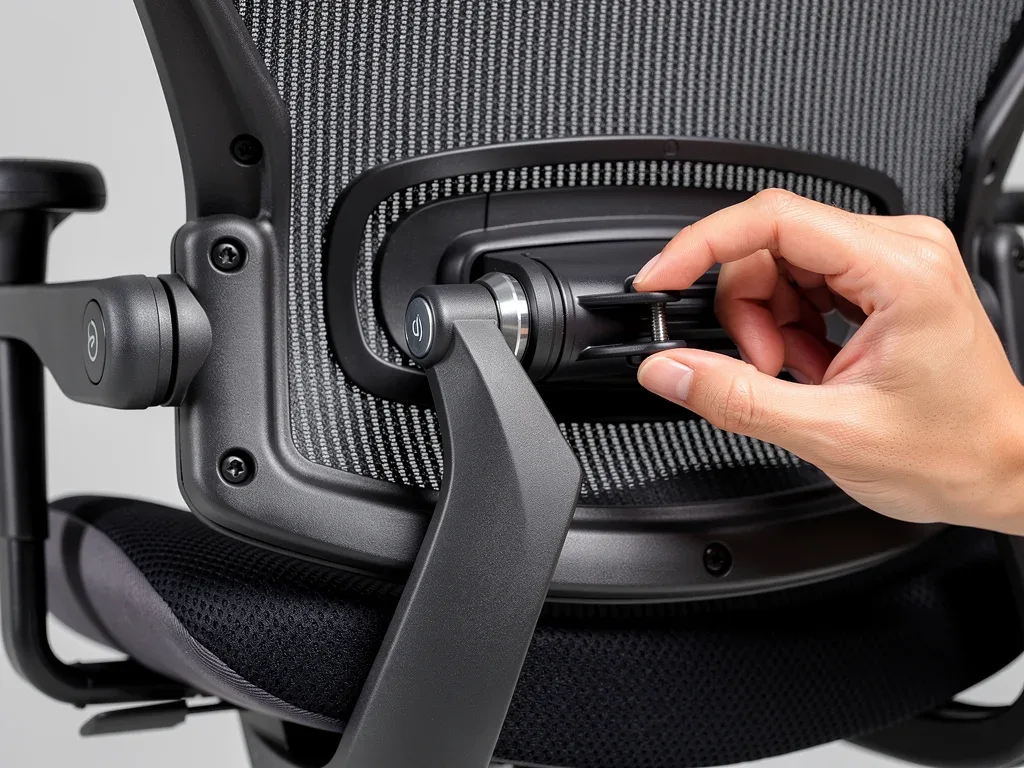
Critical Adjustment Factor 3: Lumbar Support
Lumbar support is designed to maintain the natural inward curve of your lower back. This specific support helps prevent slouching and reduces strain on the lumbar spine, which is a common source of back pain for office workers. An effective ergonomic chair will offer adjustable lumbar support.
Ideally, this adjustment should include both height and depth. Height adjustment allows you to position the lumbar support to fit the natural curve of your lower back, while depth adjustment controls how much pressure is applied to that curve. Some advanced chairs even offer dynamic lumbar support that adapts to your movements.
When evaluating how to buy an ergonomic office chair, test the lumbar support thoroughly. It should feel supportive without being overly rigid or pushing you uncomfortably forward. This feature is paramount for spinal health during an 8-hour workday, providing continuous, targeted support.
Critical Adjustment Factor 4: Armrests
Adjustable armrests are crucial for supporting your arms and shoulders, reducing tension in the neck and upper back. They should allow your arms to rest comfortably, with your elbows at approximately a 90-degree angle to your keyboard. This position helps prevent shoulder shrugging and wrist strain.
The best ergonomic chairs offer multi-directional armrest adjustments, often referred to as 3D or 4D armrests. This means they can be adjusted not only in height but also forward/backward, inward/outward, and sometimes even pivot. This versatility ensures they can accommodate various body types and work setups.
Incorrect armrest height can lead to significant discomfort, either by forcing your shoulders up or by not providing adequate support, leaving your shoulders to sag. Proper armrest adjustment is a subtle yet powerful component in the overall ergonomic equation. It's a key detail to consider when you contemplate how to buy an ergonomic office chair.
Critical Adjustment Factor 5: Backrest Recline and Tension
The ability to recline and adjust the tension of the backrest is essential for dynamic sitting, which is healthier than maintaining a static posture. Reclining allows you to shift your weight and change your spinal angle, promoting blood flow and reducing pressure on the discs.
A good ergonomic chair will feature a synchronized tilt mechanism, where the seat and backrest move together in a coordinated manner. The tension control allows you to set the resistance of the recline, ensuring it supports your body weight comfortably without feeling too loose or too stiff. This prevents sudden movements and provides stability.
Lockable recline positions are also beneficial, allowing you to secure the backrest at various angles for different tasks or moments of rest. This flexibility is critical for maintaining comfort throughout an entire workday. Understanding recline mechanics is vital when you learn how to buy an ergonomic office chair.
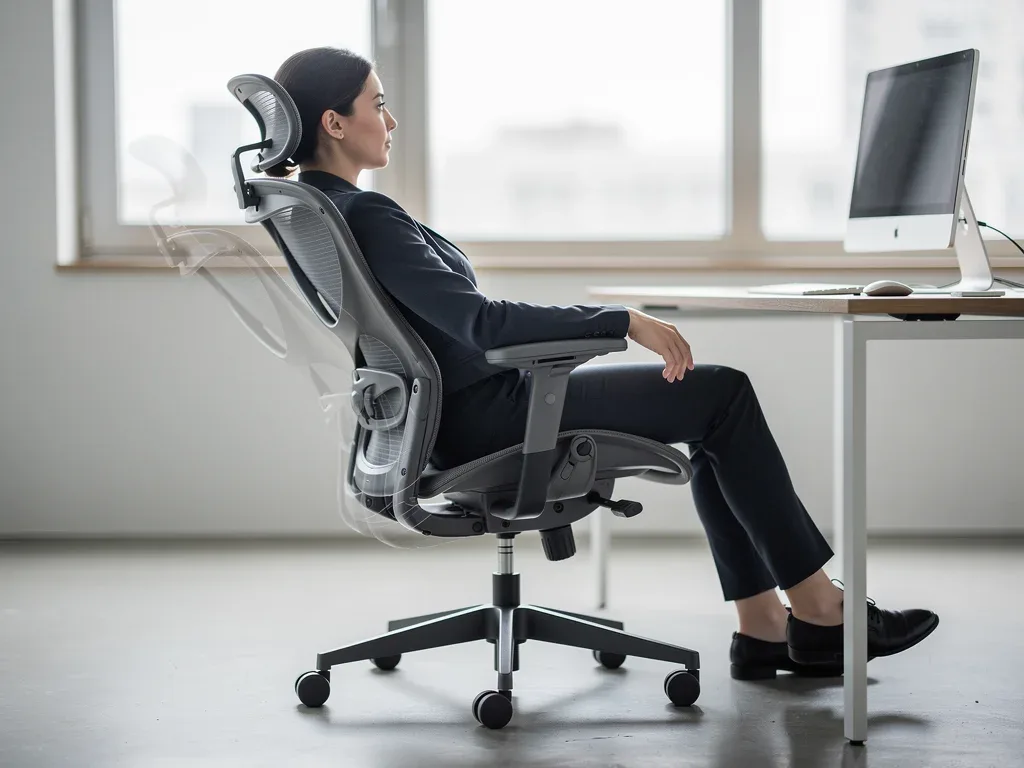
Critical Adjustment Factor 6: Headrest/Neck Support
While not all ergonomic chairs include a headrest, for those who spend extended periods working, especially with tasks that involve leaning back, an adjustable headrest can provide valuable neck and head support. It helps maintain the natural curve of the cervical spine.
An ideal headrest should be adjustable in both height and angle, allowing you to position it to support the curve of your neck without pushing your head forward. It should not force your head into an awkward position but rather gently cradle it during periods of rest or contemplation.
For individuals prone to neck pain or those who frequently recline, a supportive headrest is a significant advantage. When considering how to buy an ergonomic office chair, evaluate whether your work habits necessitate this feature. Its absence can lead to increased neck strain over time.
Critical Adjustment Factor 7: Material and Breathability
The material of your ergonomic office chair significantly impacts comfort, especially during long workdays. Breathable materials like mesh or perforated fabric prevent heat buildup and sweating, keeping you cool and comfortable. This is particularly important in warmer climates or environments without optimal air conditioning.
Beyond breathability, the quality and density of the seat foam are crucial. High-density foam retains its shape and support over time, preventing the seat from flattening out and causing pressure points. Poor quality foam can lead to discomfort and poor posture after just a few hours.
Durability is another aspect of material consideration. High-quality upholstery and robust frame materials ensure the chair withstands daily use without quickly showing wear and tear. When assessing how to buy an ergonomic office chair, prioritize materials that offer both comfort and longevity, representing a wise investment.
Key Adjustment | Benefit for 8-Hour Workdays |
|---|---|
Seat Height | Ensures feet flat, knees at 90 degrees, improving circulation. |
Lumbar Support | Maintains natural spinal curve, reducing lower back pain. |
Armrests | Supports arms/shoulders, preventing neck and upper back tension. |
Backrest Recline | Facilitates dynamic sitting, reduces pressure, and aids circulation. |
Frequently Asked Questions About Ergonomic Chairs
What is the most crucial factor when buying an ergonomic office chair?▼
While all 7 factors are important, adjustable lumbar support is arguably the most crucial. It directly addresses lower back pain, a common complaint for office workers, by maintaining the spine's natural curve. Without proper lumbar support, other adjustments may not fully alleviate discomfort during an 8-hour workday.
Can a good ergonomic chair truly prevent back pain?▼
Yes, a well-adjusted ergonomic office chair can significantly reduce and often prevent back pain caused by prolonged sitting. It promotes proper posture, distributes weight evenly, and reduces strain on the spine and muscles. However, it should be combined with regular movement and breaks for optimal results.
How often should I adjust my ergonomic office chair?▼
You should initially adjust your ergonomic office chair to fit your body perfectly. After that, minor adjustments might be needed if you change tasks, clothing, or simply feel the need to shift your posture. Dynamic sitting is encouraged, so recline and change positions periodically throughout the day.
Are expensive ergonomic chairs always better?▼
Not always, but higher-priced ergonomic office chairs often offer more robust construction, higher quality materials, and a wider range of precise adjustments. While a budget-friendly option might provide some ergonomic benefits, investing more often translates to better durability and comprehensive support for 8-hour workdays.
What is the ideal sitting posture in an ergonomic chair?▼
The ideal posture involves feet flat on the floor, knees at a 90-degree angle, hips slightly higher than knees, and your back fully supported by the backrest, maintaining its natural S-curve. Shoulders should be relaxed, and elbows at 90 degrees when typing. This minimizes strain and maximizes comfort.
Perspectives
The shift towards prolonged desk work underscores the growing importance of informed decisions when considering how to buy an ergonomic office chair.
The detailed understanding of these 7 critical adjustment factors is no longer a niche concern but a fundamental aspect of workplace health and productivity.
Monitoring advancements in ergonomic design and material science will continue to shape future recommendations, ensuring that individuals can maintain optimal well-being while navigating demanding work schedules.